
Bazzite · ROG Flow Z13 (2025, GZ302EA)
How I Customized Bazzite on the ROG Flow Z13 With One Containerfile
My ASUS ROG Flow Z13 (2025, GZ302EA, AMD Strix Halo) runs Bazzite, but not stock Bazzite: every fix this tablet needs and the tools I want are baked into my own image, and GitHub rebuilds it for me every week. This guide is the written version of the video: what makes that possible, my Containerfile line by line, and the three bugs that got me here.
Why you can’t just edit system files on Bazzite
On a normal Linux install you’d fix hardware problems by editing files under /etc or /usr, installing packages, and tweaking services. On Bazzite, most of the system is read-only. That sounds annoying, and it’s actually the best thing about it.
Bazzite doesn’t update file by file. It updates as one complete, tested image, like a big app update: you download the new one, reboot into it, and the old one is still on disk in case you need it. If the new one is bad, you boot the old one. Nothing is ever half-updated.
The image is a container (bootc)
Bazzite is built on bootable containers (bootc). The whole operating system is packaged the same way a Docker or Podman container image is; the difference is that your computer boots it.
So how do you add your own fixes or tools? You don’t change the system. You customize the container. If you’ve ever written a Dockerfile you already know how: write a Containerfile that starts from Bazzite and add your changes on top.
My Containerfile, section by section
My public version is here: github.com/stephensedge/z13-bazzite. It’s about 50 lines on top of Bazzite.
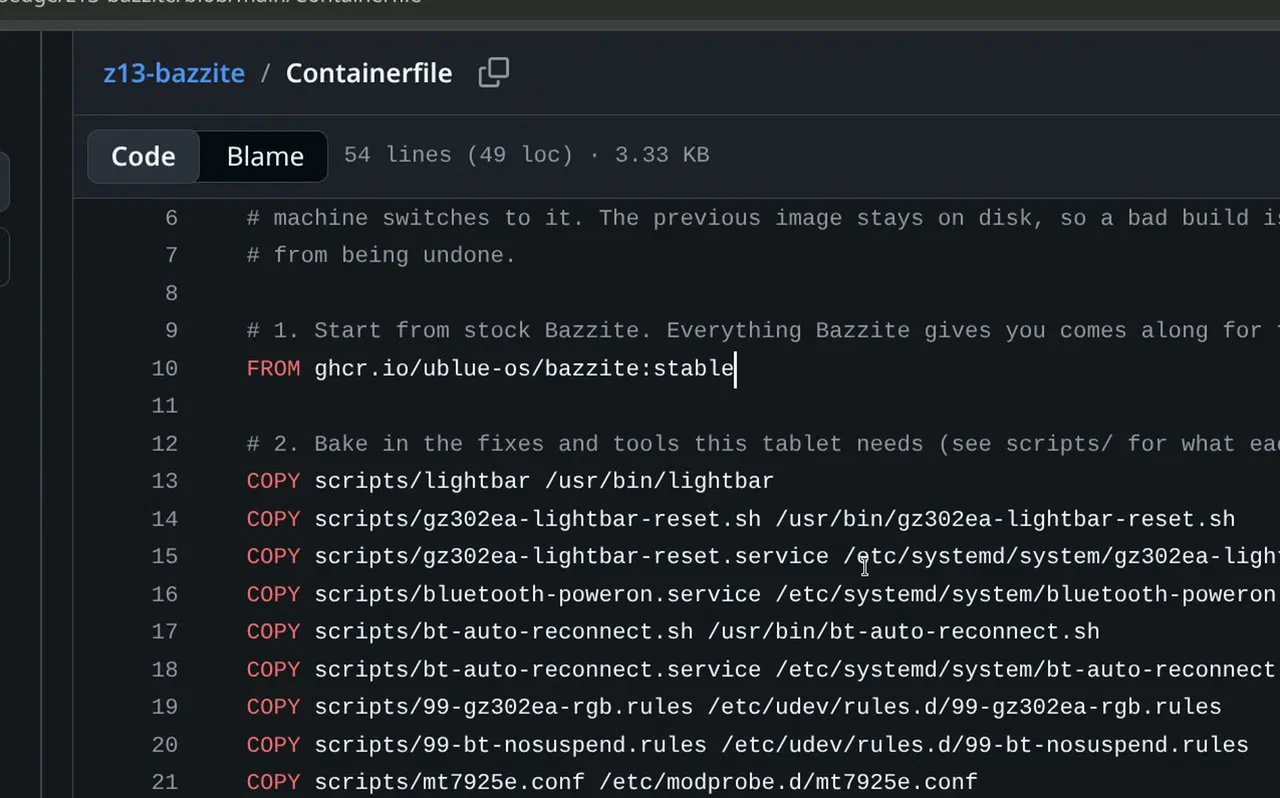
1. Start from stock Bazzite. Everything Bazzite ships comes along for free. I didn’t build any of that; it’s the Universal Blue and Bazzite teams’ work.
FROM ghcr.io/ublue-os/bazzite:stable
2. Copy in the fixes this tablet needs. Each file is a small, readable fix: the light bar tool, Bluetooth that powers on at boot and reconnects dropped devices, a Wi-Fi power-saving fix for suspend, a USB wakeup fix, and readable sensor names.
COPY scripts/lightbar /usr/bin/lightbar
COPY scripts/bluetooth-poweron.service /etc/systemd/system/bluetooth-poweron.service
COPY scripts/bt-auto-reconnect.sh /usr/bin/bt-auto-reconnect.sh
COPY scripts/mt7925e.conf /etc/modprobe.d/mt7925e.conf
COPY scripts/usb-wakeup-fix /usr/lib/systemd/system-sleep/usb-wakeup-fix
COPY scripts/gz302ea-sensors.conf /etc/sensors.d/gz302ea.conf
# ...and a few more; see the repo
3. Install ASUS’s control software (asusctl and ROG Control Center, from the asus-linux project) and switch on the services:
RUN curl -Lo /etc/yum.repos.d/asus-linux.repo \
    https://copr.fedorainfracloud.org/coprs/lukenukem/asus-linux/repo/fedora-$(rpm -E %fedora)/lukenukem-asus-linux-fedora-$(rpm -E %fedora).repo

# condensed: the full step also turns on Bluetooth auto-enable and reconnects,
# and enables the light bar and Bluetooth services
RUN rpm-ostree install asusctl asusctl-rog-gui \
    && systemctl enable asusd.service \
    && ostree container commit
4. Add z13ctl, a little tool someone built specifically for this tablet (RGB, fan and TDP control). It’s a static binary, so there’s nothing to layer.
That’s the whole customization.
GitHub Actions builds it, every Sunday
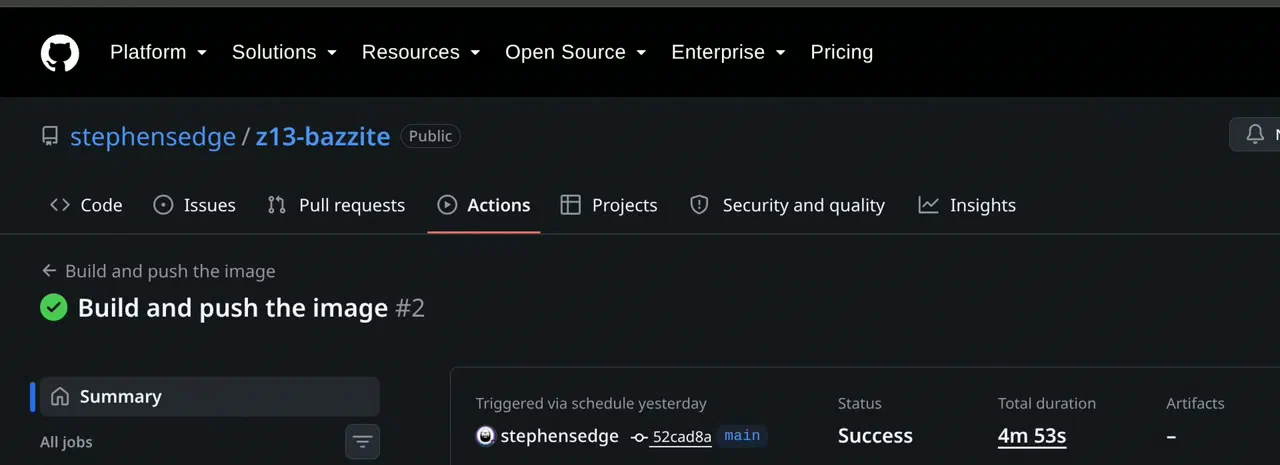
I don’t build the image on my own machine. I could, but I want it handled outside the machine. GitHub Actions builds the new image in about 5 minutes and publishes it to GitHub’s container registry, and a schedule rebuilds it every Sunday on its own:
on:
  schedule:
    - cron: '0 6 * * 0'   # Sundays, 06:00 UTC
So when Bazzite ships an update, my version picks it up automatically, and the tablet just pulls it like any other update.
Switching to your image, and the safety net
Switch an existing Bazzite install to your image, then reboot:
sudo bootc switch ghcr.io/<your-github-user>/z13-bazzite:latest
systemctl reboot
Then check what’s on the machine:
rpm-ostree status
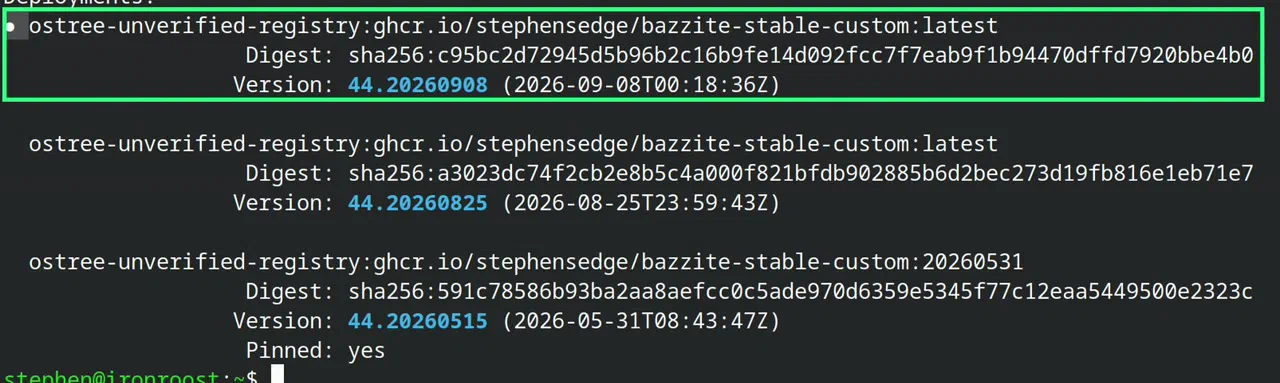
This is the part that lets you be brave. The tablet keeps more than one version of its system: the one I’m on (marked with the dot), the previous one, and one I’ve pinned so it never gets cleaned up. That pinned image is my known-good fallback. To pin the first deployment in the list (the booted one, marked with the dot, as long as no update is waiting to be applied):
sudo ostree admin pin 0
If anything goes wrong, pick an older image in the boot menu, or roll back and reboot:
sudo bootc rollback && systemctl reboot
No reinstalling, no recovering files, just a reboot.
Bug 1: a black screen at full brightness
If I turned the brightness all the way up, the screen went black. I tested it value by value: the brightness range is 0 to 65,535, and on my unit every value up to 64,363 worked, while 64,364 and above went black. That’s about 98.2%.
The driver applies a custom brightness curve for this particular panel, and at the very top the math overflows: instead of stopping at the maximum, it wraps around to zero.
The fix is one kernel parameter, which disables the custom brightness curve. In the kernel’s own words, DC_DISABLE_CUSTOM_BRIGHTNESS_CURVE (0x40000): “disable support for custom brightness curves”.
sudo rpm-ostree kargs --append=amdgpu.dcdebugmask=0x40000
systemctl reboot
On my tablet it’s combined with two display-stability flags as amdgpu.dcdebugmask=0x40600 (0x400 disables Panel Replay, 0x200 disables PSR SU). Kernel parameters like this are a setting on the machine, not in the image, which is why they survive every image update. That difference is something I learned the hard way, which brings me to bug 2.
Bug 2: the “frozen” screen that was my own fault
Sometimes the screen froze while the machine kept running: I could still log in from another computer. It wasn’t a crash. The display engine itself had stopped (flip_done timed out, vblank wait timed out in the logs), and sleep was part of it: the tablet wasn’t reaching its full deep sleep.
I dug in for weeks, tried setting after setting, and at one point wrote up a detailed bug report for the kernel developers. Before sending it, I ran the most boring test of all: every boot setting back to default. Deep sleep then worked, about 99% of the time (99.1% residency, “Last S0i3 Status: Success”). The bug was my own setting, so I withdrew the report.
That’s the most important lesson in this whole guide: before you blame the kernel, test the boring baseline. Otherwise you waste volunteers’ time.
Bug 3: every shutdown hung (the one Linus fixed)
To get some display fixes early, I ran a test kernel for weeks, and it created a new bug: every shutdown hung, forever, and only a hard reset got me out. I traced it to one change in the Wi-Fi driver (wifi: mt76: Disable napi when removing device), a change meant for a different Wi-Fi chip.
Before Linux 7.2 shipped, that change was reverted, with Linus Torvalds’ sign-off on the revert (commit 3aa1dcaa4f6f). I didn’t just trust that: I checked the revert was actually in the 7.2 release before moving my image back to bazzite:stable. You can do the same in a kernel checkout:
git tag --contains 3aa1dcaa4f6f | grep -x v7.2
Trust, but verify. Since then it’s been clean.
Should you customize Bazzite?
If Bazzite works on your hardware out of the box, honestly, no. Stock Bazzite is great, and you’d get everything I have minus my tablet fixes and tools.
But if your hardware needs fixes, or you have your own tools you’d like baked into every reinstall, yes, it’s a great fit:
- Fork my repo, or start from Universal Blue’s official image-template (it also sets up image signing).
- Change the
Containerfile. - Push it to GitHub. In about five minutes you have your own custom Bazzite.
bootc switchto it. If you get it wrong, reboot into the previous image.
My public image is the clean version of what my tablet runs: the same fixes and gaming tools, minus a few personal work things. Its README says exactly what has and hasn’t been tested, so read that before you switch.
FAQ
Can you customize Bazzite without breaking updates?
Yes. Build your own image FROM ghcr.io/ublue-os/bazzite:stable and rebuild it on a schedule; every rebuild picks up Bazzite’s latest stable image with your changes on top.
What is bootc? Bootable containers: the operating system is shipped as an OCI container image, and your machine boots it. Updates are whole images, and the previous one stays available for rollback.
How do I roll back Bazzite?
Pick the previous deployment in the boot menu, or run sudo bootc rollback and reboot. Pin a known-good deployment with sudo ostree admin pin so it’s never cleaned up.
Why does my screen go black at 100% brightness on Linux?
On my ROG Flow Z13 it was the amdgpu driver’s custom brightness curve overflowing near the top of the range. amdgpu.dcdebugmask=0x40000 disables the custom curve. Other hardware may have a different cause.
Credits: Bazzite and Universal Blue, the asus-linux project, and z13ctl by dahui. Thanks to everyone who does the real work upstream.